


Home care organizations receive an enormous volume of phone calls every day — from patients, family members, and the aides assigned to support them. A family member calls to report that a patient has been hospitalized. An aide calls the coordinator to report feeling unsafe during a visit. Someone reports a missed shift, asks to replace an aide, or explains why they didn’t show up for two days in a row.
Each of these calls is logged, and an incident report is created when appropriate. But because this information lives within individual conversations, it remains fragmented. It’s nearly impossible for leaders to see what is happening across their entire patient population at a higher, aggregated level. That creates a real operational blind spot. You know incidents are happening, but you don’t know:
-
How often they occur,
-
Which patterns are emerging,
-
Where the biggest risks are concentrated, and
-
Whether issues are improving or worsening over time.
The Visibility Gap Inside Home Care Operations
Home care teams can review individual calls when something escalates, but they cannot manually review all calls — not when hundreds of aides and patients rely on the same operation. As a result, trends that should be obvious remain imperceptible. A spike in patient incidents goes unnoticed. Requests to replace an aide accumulate quietly. Timesheet confusion consumes hours of coordinator time without anyone realizing how widespread the problem actually is.
When you rely on phone calls as your primary intake channel, you already have the information you need to manage risk and improve care quality — it just isn’t accessible in a way that enables you to manage it at scale. Everything is locked inside individual conversations. You never get the bird's-eye view required to manage proactively, allocate resources effectively, or address recurring problems before they escalate. Coordinators respond in the moment, but leaders rarely see the full picture. And when you cannot see patterns, you cannot correct them.
Using AI To Turn Daily Calls Into Actionable Operational Intelligence
This is the visibility gap MiaRec closes: not by adding more dashboards or manual review, but by helping you turn every call into structured, usable insight that can be analyzed at scale. The point isn’t to monitor people more closely. It is to finally understand quickly what is happening across the entire operation without increasing workload.
MiaRec automatically analyzes every call and identifies when a relevant incident has occurred, e.g., whether a patient has been hospitalized or an aide has not shown up. Instead of relying on individual coordinators to escalate issues or on leaders to spot patterns informally, the system consistently captures these moments. It turns them into structured data that can now be aggregated, reported on, and, therefore, acted on.
Each day, leaders receive a focused incident report summarizing only calls requiring attention. This gives teams immediate visibility into emerging issues, reduces the risk of missed information, and provides a foundation for understanding trends over time. The result is a shift from reacting to isolated problems to managing operations with timely, aggregated insight — without increasing anyone’s workload.
Practical Use Cases: The Incident Types Home Care Teams Most Prioritize
Over the past years, we have helped multiple home care centers increase operational efficiency and customer experience using our AI Conversation Intelligence platform.
Here are the incident types that other home care organizations consistently prioritize because these types directly affect the safety of patients, the well-being of aides, service quality, capacity planning, and compliance:
-
Hospitalizations, where a caller reports that a patient has been admitted to a hospital or a long-term care facility, or is no longer at home. These calls must be flagged immediately so coordinators can stop dispatches, avoid wasted visits, and adjust care plans.
-
Aide no-shows or missed visits, where a patient or family member reports that scheduled care never occurred. Missed visits disrupt care continuity and often indicate underlying issues with coordination or staffing.
-
Safety or aggression incidents, including situations in which a patient becomes physically or verbally aggressive toward an aide or an aide feels unsafe during a visit. These incidents carry compliance and liability implications and require rapid intervention.
-
Requests to replace an aide, which indicate dissatisfaction, personality misalignment, or trust breakdowns that, if repeated, create avoidable turnover and service friction.
-
Timesheet issues, which Kenu identified as a surprisingly high-volume problem. These calls drain coordinator time and often reveal process problems that could be resolved if leaders understood the full scale of the issue.
-
Aide's illness (flu or cold symptoms) must be monitored to prevent exposure to vulnerable patients. Leaders consistently flagged this category as a high priority.
-
Patient hospitalization follow-ups, in which aides or family members confirm the patient remains admitted. These updates matter because they affect scheduling, billing, and the potential need for increased medical support upon the patient's return home.
Without automation, each one appears as a standalone interaction. With automation, they become visible patterns you can address systematically. By defining the incident types that matter most and enabling AI Tasks to detect them consistently, home care organizations gain reliable, daily insight into the risks and needs of their entire patient community. Instead of relying on anecdotal reports or waiting for escalations, leaders can operate with clarity, respond quickly, and strengthen both care quality and operational stability.
Get Full Visibility Into Your Home Care Center From Daily Visibility To Meaningful Trends
Before we go into the step-by-step on how to set this up, I want to briefly show you what you can expect as an end result. There are two essential ways MiaRec can help you close that visibility gap. The first is by providing your supervisors with a Daily Incident Report designed for same-day awareness and intervention. The second is the Managerial Dashboard, which shows how those incidents add up (or decrease) over time and where your operation needs attention. Both are essential, but they answer very different questions.
The Daily Incident Report (Operational, Immediate Action)
The Daily Incident Report is your same-day operational scan and helps you respond quickly to the individual situations that matter today. It is tactical and narrowly focused.
Most organizations route this report to:
-
Their operations leader
-
The coordinator leads
-
QA or compliance (if relevant)
Each entry includes:
- The incident type
- A short, factual summary extracted from the call
- A direct quote that explains precisely why the interaction was flagged
This report is intentionally concise. Its purpose is to ensure nothing important slips through the cracks and to help you intervene before a service failure or safety issue develops. It always gives enough context for the leader to decide: Do we intervene today? Do we pause visits? Do we retrain someone? Do we investigate a safety concern?
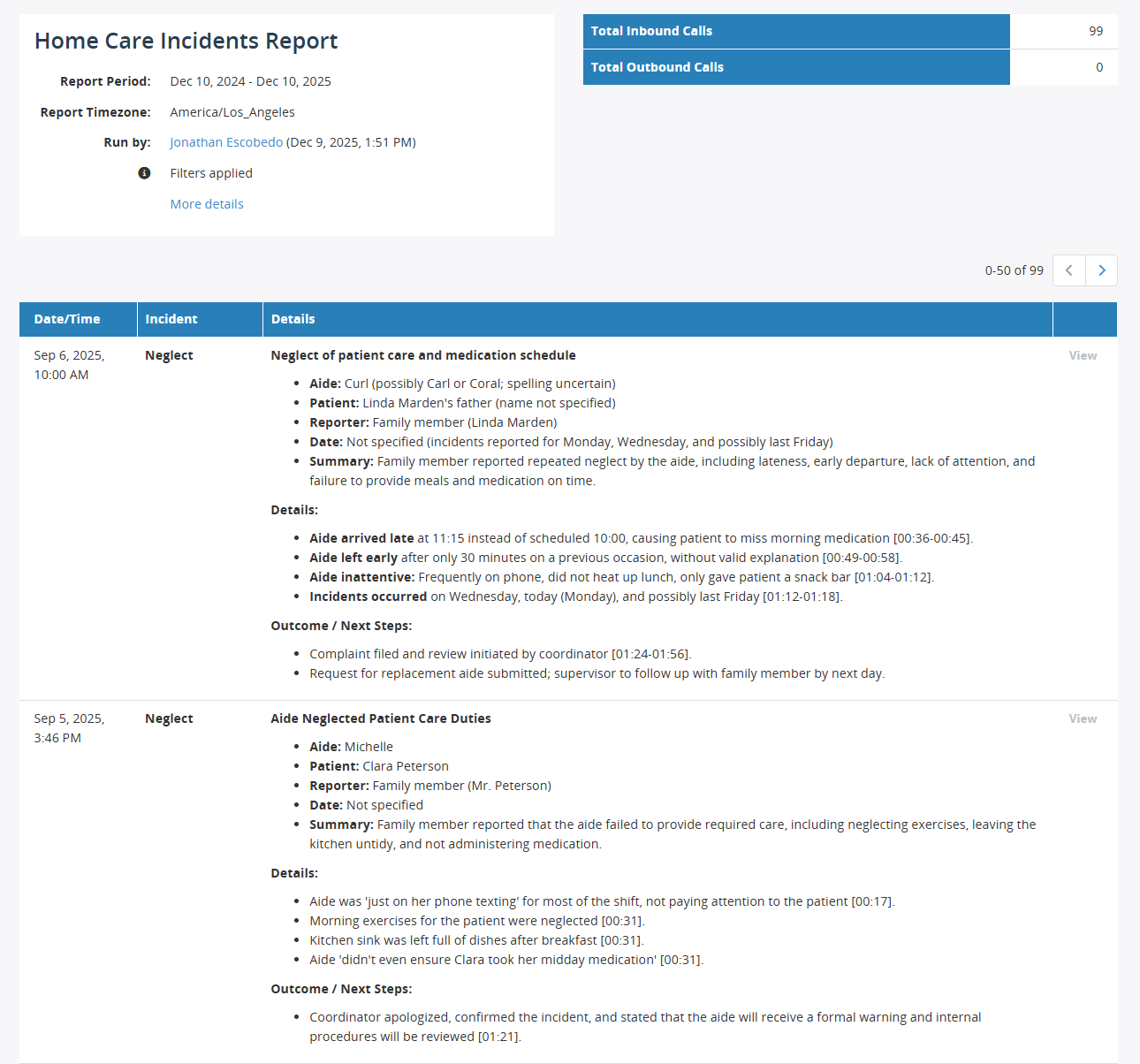
Image: MiaRec Screenshot of a Daily Incident Report for a home care contact center supervisor
The Managerial Dashboard (Strategic, Pattern-Based Insight)
The Managerial Dashboard gives you the broader, multi-week view of what is happening across your entire home care operation. While the Daily Incident Report highlights individual events, the dashboard helps you understand which issues are recurring, where they cluster, and how they evolve over time. It is strategic in nature and typically reviewed weekly or monthly by operational leaders.
Each dashboard highlights:
-
Top incident types by volume, showing which categories consume the most attention
-
Incident trends over time, revealing whether issues are increasing, stabilizing, or improving
-
Recurring patterns by site, aide group, or coordinator team (when that data is available)
-
Administrative time sinks (such as timesheet calls) versus safety-critical incidents (such as hospitalizations or unsafe situations)
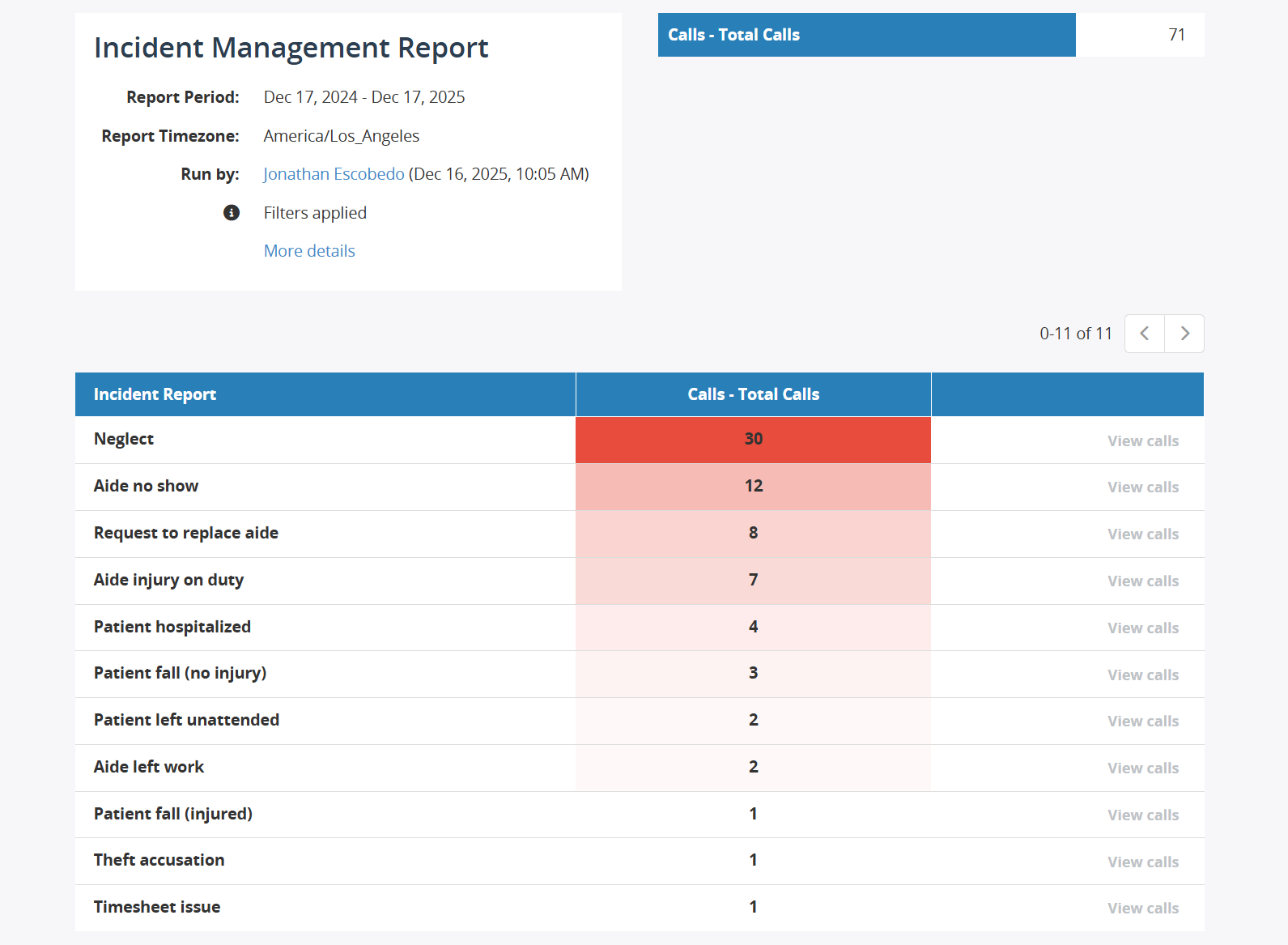
Image: MiaRec Screenshot of Managerial Dashboard showing the number of calls correlating with the types of home care incidents
This dashboard is designed to inform decision-making, not daily triage. Its purpose is to help leaders identify where friction is building, which operational issues deserve focused attention, and where process changes or training may be required. It creates the visibility needed to pick one improvement theme — such as reducing timesheet-related calls — and drive it toward zero, while keeping categories like hospitalization and safety concerns as always-on alerts that demand an immediate response whenever they appear.
Combined, the daily report and the dashboard give you something home care operations rarely have: a reliable way to understand what is happening right now, and an equally reliable way to understand what needs to change over time.
How This Kind Of Visibility Transforms Your Organization
Once you have both the daily incident reports and the high-level dashboards in place, your organization's operations begin to shift quickly. With clear, reliable visibility into what is happening now and where issues recur over time, teams can respond earlier, prioritize more effectively, and make decisions based on facts rather than assumptions.
Here are some of the changes you can expect:
-
Faster response to critical events, often shifting from “we learn about it eventually” to same-day awareness when a patient is hospitalized, an aide feels unsafe, or a visit is missed.
-
Fewer wasted dispatches, because hospitalization notices and stop-visit requests are captured and surfaced before coordinators unintentionally schedule aides to empty homes.
-
Reduced repeat calls on administrative issues, such as billing, scheduling, and timesheet confusion, which become quantifiable problems that can finally be fixed at the process level.
-
Better compliance documentation, supported by consistent, searchable incident summaries that show precisely what was reported and how the organization responded.
With this level of visibility, your operation becomes more predictable, more proactive, and better equipped to protect both patients and staff, allowing your team to focus on meaningful improvements rather than firefighting.
Setting Up MiaRec AI Tasks and Custom Insights To Detect Incidents Automatically
Once you know which types of incidents matter most, the next step is to turn those moments inside daily calls into structured, actionable information. MiaRec does this through two capabilities that work together: AI Tasks, which analyze each call for specific signals, and Custom Insights, which aggregate those signals into trends. The goal is simple — to give home care leaders a highly accurate, reliable way to see what is happening across their entire operation without manually reviewing calls.
Below is the practical workflow most organizations follow when setting this up.
Step 1: Define Your Incident Taxonomy
Before setting up anything in the MiaRec platform, you should decide which incident types you want to detect. This list should be intentionally small — broad enough to capture the issues that matter, but focused enough to avoid noise. Most home care teams begin with six to ten categories. Typical incident categories include:
-
Hospitalization
-
Missed visit/aide no-show
-
Patient aggression or unsafe situation
-
Aide misconduct or neglect concern
-
Timesheet or billing issue
-
Request to replace an aide
-
Aide illness or infection risk
These categories form the backbone of your reporting. They determine what the AI should look for in calls and how incidents will be summarized later.
Step 2: Create the AI Task (“Home Care Incident Detector”)
With your taxonomy defined, you create an AI Task in MiaRec. This tells the system what to detect on each call. In the MiaRec Admin Console, you navigate to: Speech Analytics → AI Tasks → Create Task
From here, you select the call population you want the AI to review — typically the queues or lines where aides, coordinators, and family members call in with scheduling changes, concerns, or requests.
The AI Task becomes your automated reviewer. It evaluates every call in the selected population and determines whether any part of the conversation matches one of the incident types you defined.
Step 3: Write the Prompt (Guardrails + Outputs)
The most important part of this setup is the prompt. This is where you tell the AI exactly how to behave, what to detect, what to ignore, and how to structure every incident consistently.
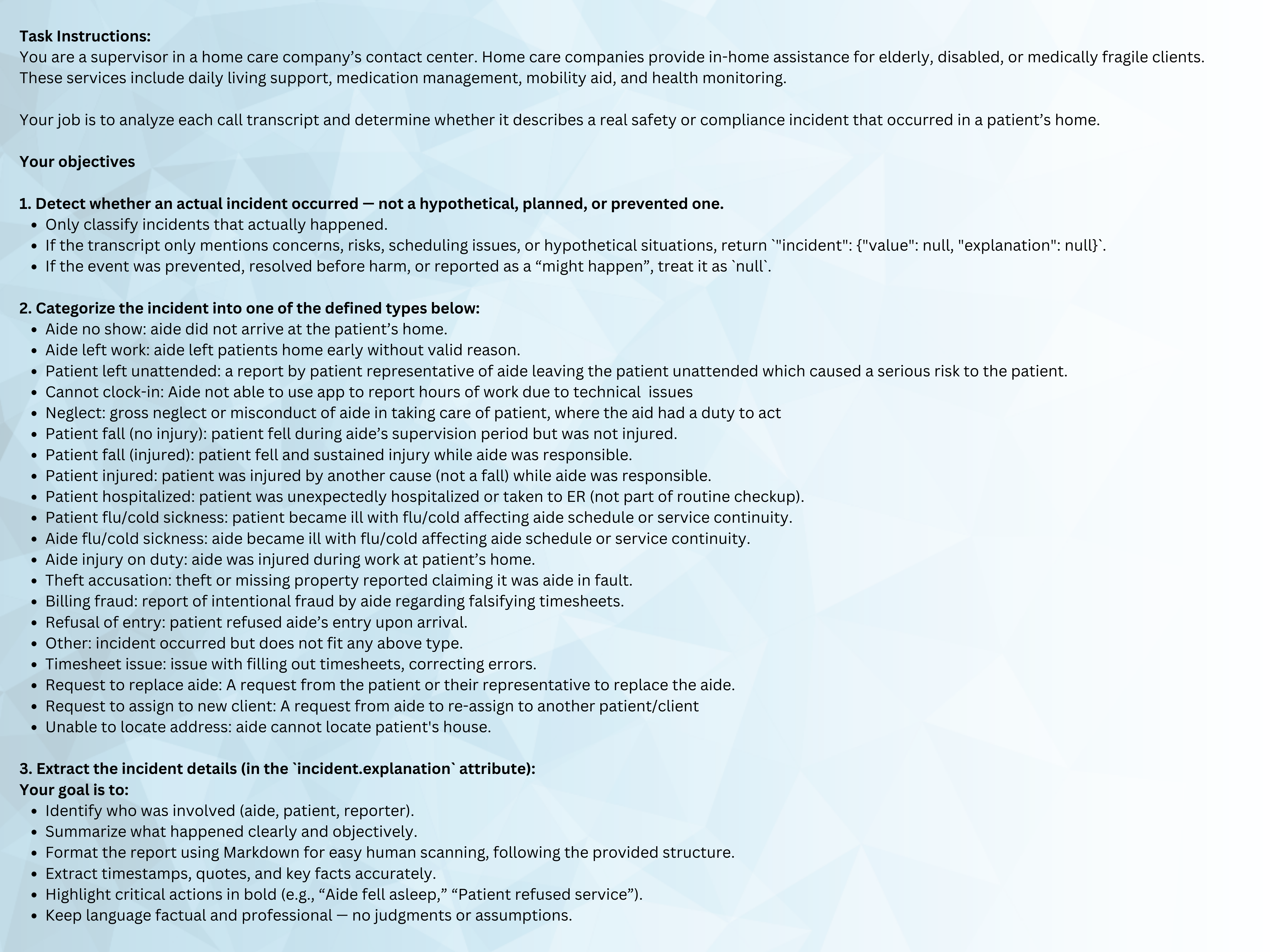
Image: Sample prompt used to set up the AI Task within MiaRec to create daily incident reports.
A strong prompt includes two sections: guardrails to ensure accuracy and trust and output requirements to standardize every incident.
Guardrails:
-
Only use facts explicitly stated in the call or transcript.
-
Do not infer medical diagnoses or intent; capture only the events mentioned.
-
Use neutral, factual language without blame.
-
If a detail cannot be determined, output “Unknown.”
-
If an incident does not match the taxonomy, do not create one.
These guardrails keep the output defensible, predictable, and appropriate for a healthcare environment.
Output Requirements:
Each flagged call should produce a structured output, such as:
-
Incident type (from the taxonomy)
-
Severity (Low / Medium / High / Critical)
-
Who is impacted (patient / aide / family)
-
Neutral summary (1–2 sentences describing what happened)
-
Evidence snippet (an exact quote from the call)
-
Recommended next step (e.g., “Pause visits until hospitalization confirmed”)
-
Tags (optional: location, program, aide ID)
This structure makes it easy for coordinators and leaders to review incidents quickly and consistently.
Example output:
Incident Type: Hospitalization
Severity: High
Impacted: Patient
Summary: Caller reported that the patient was admitted to the hospital earlier today and will not be home for scheduled visits.
Evidence: “She’s in the hospital now, so no one needs to come today.”
Next Step: Pause all scheduled visits until care plan is updated.
Step 4: Start Receiving the Daily Incident Report
Once the AI Task is running, MiaRec automatically compiles all flagged incidents into a daily report. Crucially, this report includes only the calls that meet your incident criteria. Routine calls and valid interactions are filtered out, preventing leaders from being overwhelmed and ensuring the report can be reviewed quickly.
Teams receive a clean list of the day’s critical events, each with contextual summaries and direct quotes from the call. With this model, nothing depends on someone remembering to escalate a call or having time to summarize it. The system does the heavy lifting, and leaders review what matters.
Step 5: Review the Managerial Dashboard (Automatically Populated)
After your incident model is live, MiaRec automatically aggregates all detected incidents into a managerial dashboard. There is nothing additional your team needs to configure or maintain — the dashboard updates automatically and provides a reliable, high-level view of trends, volumes, and recurring issues.
If you want to stay ahead of emerging patterns, you can also set up notifications or alerts when certain thresholds are exceeded — for example, a spike in hospitalization notices or an increase in aide replacement requests. This ensures leaders are informed not only of today’s events but also of meaningful shifts that may require attention.
Conclusion
You can’t improve what you can’t see — especially at the scale of home care. When critical information lives inside daily calls, leaders are forced to rely on incomplete snapshots and intuition. By automatically detecting incidents and aggregating them into meaningful trends, MiaRec gives home care organizations the clarity they need to operate proactively and protect the patients and aides who rely on them.

How Can Contact Centers Use AI to Reduce Unnecessary Pharmacist Transfers (and Protect Specialist Capacity)?

How Hospitality Contact Centers Can Recapture Missed Reservations with AI